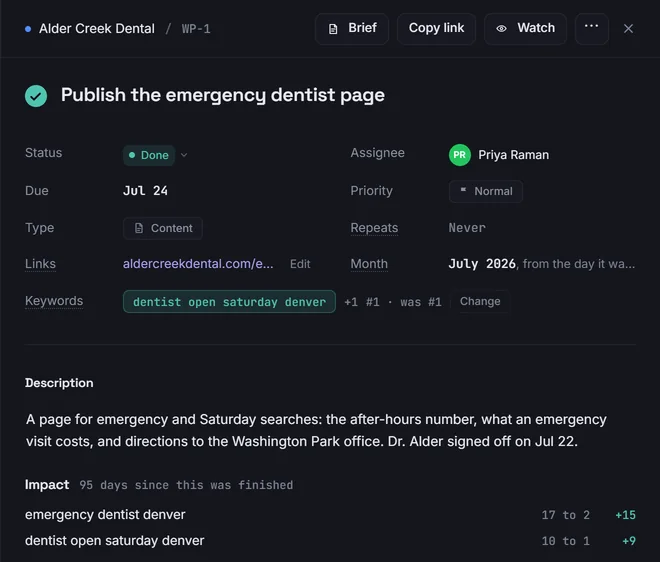
Your team finishes the task
Link a task to the keywords it should move. Cairn records where they stood the day it shipped, and shows what has changed since.
Cairn tracks your clients' rankings in search and on the map, runs your team's work for them, and reports both under your own brand. Finish a task and the client sees it, their chart marks the day, and their next report names it.

Work, on the chart. Each finished task is dated where it shipped, so a climb has its reason beside it.
Most agencies keep rankings in one tool and tasks in another, then build the report by hand at the end of the month. In Cairn they share the same data, so finishing the work is already half of reporting it.
Link a task to the keywords it should move. Cairn records where they stood the day it shipped, and shows what has changed since.
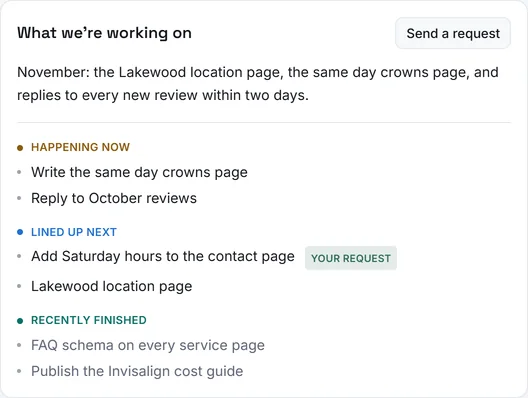
Client-visible work posts to their portal on its own: what is happening now, what is next, and what just finished. Their requests land in your backlog.
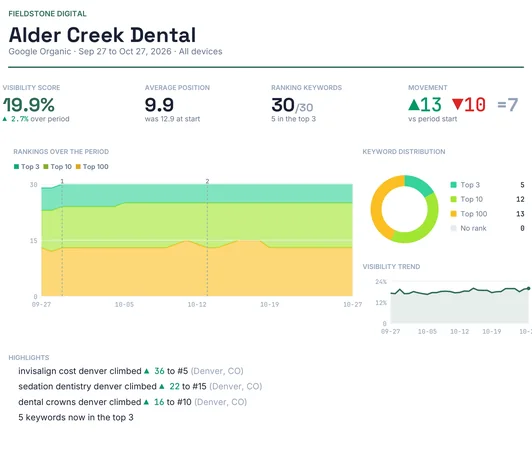
The monthly PDF lists the work delivered, and the dated marks on the rankings chart show where each piece landed.
Organic positions from the coordinates your client's customers search from, on desktop and mobile, with the map pack and Google's AI Overviews read in the same check.

A circle of search points around each location shows where the business wins the map pack, street by street, and who takes it where it does not. Scan weekly, monthly or on demand, and compare any two scans.

Each client gets a portal with no login, in your colours and under your logo. It shows only what you choose to publish: progress in plain language, search traffic, rankings, map grids and the work.


Organic, map grids or both, in light or dark, scoped to the keywords, grids or months of work you choose. Set a day and it emails itself to everyone the client wants, with a written summary drawn from the real numbers.
Boards, lists, a calendar, recurring tasks and playbooks, shaped for SEO work, with a place for everyone from staff to freelancers. Waypoint suggests work from the data, such as a keyword sitting just off page one, and never creates a task until someone says yes.

Connect a client's Google Ads account and Cairn reads spend, leads and cost per lead every day, read only, next to the organic and map rankings you already track. It is the one place you will see a client paying for clicks on a search they already win.


Staff draft updates, offers and events for a client's Business Profile inside Cairn, and nothing goes out until you approve it. Schedule ahead, see what Google accepted, and keep every post's history.
Cairn connects once, through your agency's own Google account, and is built to do one thing with it: publish posts. It cannot change a business's name, hours, categories or owners.

Clicks, impressions and the queries that moved, for every client, synced daily.
Share of voice against the rivals you name, measured on the keywords you already track.
A weekly summary drafted from the real numbers. Anything worrying waits for your review before a client sees it.
Add Cairn as a connector and ask about any client in plain language. It answers from your data, is read only unless you allow more, and can never delete or spend.
Owners, agency partners, staff, clients and freelancers each see their own version of Cairn, and nothing beyond it.
Import keyword history from Whitespark and past work from ClickUp, so nothing starts from zero.
An agency connects its clients' Google accounts to Cairn. That is a responsibility, and Cairn is built to carry it.
Search Console and Google Ads are read only. On Business Profile, Cairn writes posts and nothing else.
Every agency's data is isolated, and an automated test checks every part of Cairn against it before a change ships.
Your clients' data is not sold, not used for advertising, and not used to train AI models.
Disconnect a service in one click, which revokes Cairn's access at Google. Ask, and we delete your data.
The detail is in the privacy policy, including exactly what Cairn reads from each Google service.
Coming next
Facebook and Instagram spend, leads and creatives, beside Google's.
Form submissions from each client's site, with where each one came from.
Ratings, new reviews, calls and direction requests from Business Profile.
I built Cairn because every tool I paid for did one part of the job. Rankings lived in one place, map grids in another, the work in a third, and the monthly report was a day of copying between them. Clients saw a PDF of numbers and had to take the work on trust.
Cairn puts it all in one place, so the report comes from what actually happened. It was built inside a working agency, against real clients, and every screen has done real work before anyone else was asked to use it.
It is in early access while I bring on a small number of agencies. If that sounds like yours, I would like to hear from you.
Cairn is opening to a small number of local SEO agencies. Tell us a little about yours and we will reply personally, by email.
Already have an account? Sign in.
Questions first? Write to support@rankcairn.com.